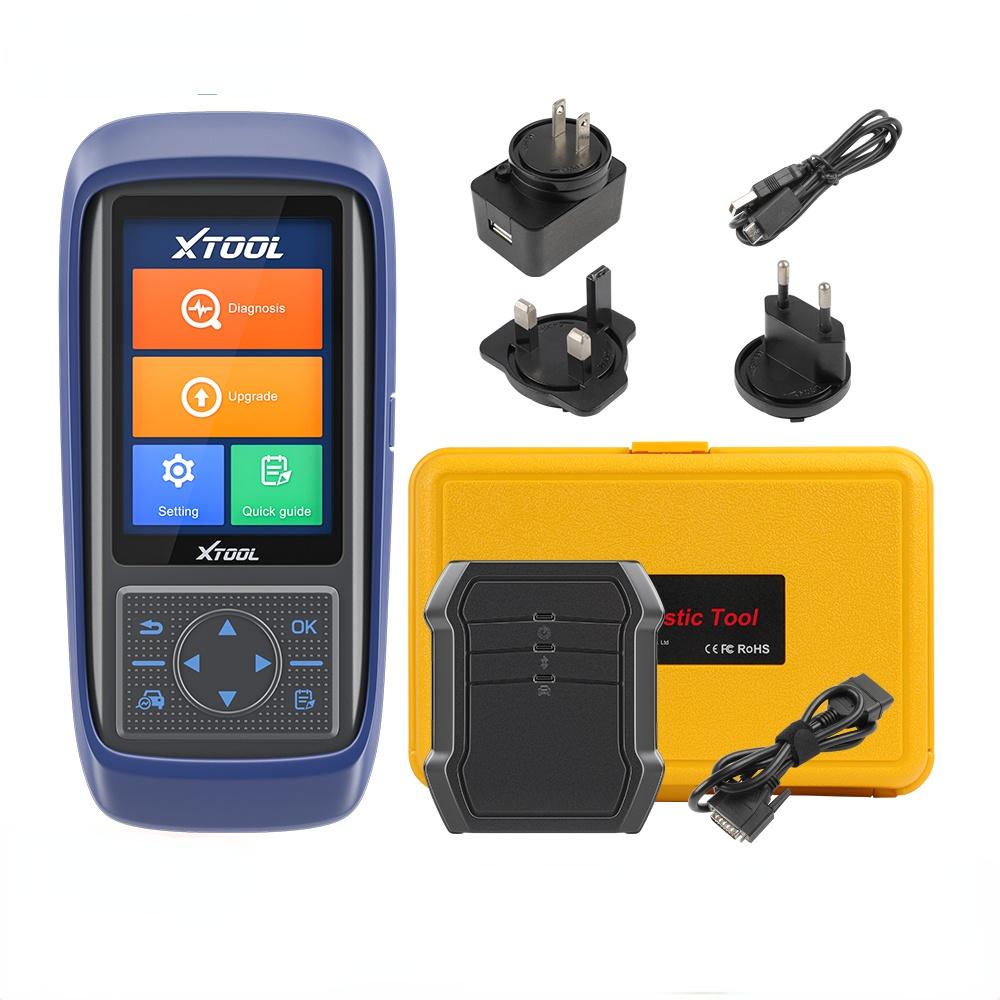
The XTOOL A30 Pro is a wireless automotive diagnostic scanner that connects to a compatible vehicle through its OBD2 port and communicates with a supported phone or diagnostic device. It can read fault codes, display live data, scan supported vehicle systems, and run certain bidirectional tests and service functions. Its exact abilities depend on the vehicle, model year, control module, and software support.
For car owners in the United States, the XTOOL A30 Pro offers a way to look into vehicle problems without buying a large shop scanner. A check engine light, an ABS warning, or an odd sensor reading can leave you guessing. This tool can help you gather useful data before you decide what to do next.
The key feature is bidirectional control. A standard code reader mainly asks the car for stored data. A bidirectional scanner can also send certain commands to supported vehicle systems. That can help you test a part or narrow down a fault, but it does not mean the tool can control every part on every car.
The A30 Pro is not a magic fix for every warning light. It cannot repair a broken wire, replace a failed sensor, or prove that a part is bad just because a code names that part. Before buying one, check the exact functions supported for your vehicle and learn how to use its active tests safely.
The XTOOL A30 Pro is an automotive diagnostic tool made to help users inspect electronic systems in supported vehicles. It works through the car’s onboard diagnostic connection and communicates with compatible diagnostic software. Instead of relying only on a warning light, you can view stored fault codes and other data that may explain what is happening.
The product is aimed at people who want more than a basic engine code reader. Depending on the vehicle, it can access systems such as the engine, transmission, anti-lock braking system, airbag system, and body control modules. Not every listed system or function will be available on every car.
The A30 Pro is also different from a simple Bluetooth code reader that only shows generic engine trouble codes. Its supported functions can include manufacturer-specific diagnostics and active tests. Still, it is not the same as a full dealer-level workstation with every programming, coding, and repair feature.
Source: xtool.co.uk
Wireless diagnostics
The diagnostic interface communicates wirelessly with a compatible device, reducing the need to stay beside the OBD2 port while viewing supported information.
System-level scanning
The tool can inspect supported control modules rather than limiting every scan to generic engine codes.
Active testing
Supported bidirectional commands can help check whether selected components respond when the scanner requests an action.
Maintenance functions
Certain service procedures may be available for supported vehicles, but the menu and coverage depend on the vehicle and software.
How Does It Differ From a Basic OBD2 Reader?
A basic OBD2 reader is mainly used to retrieve standard emissions-related information and engine fault codes. Some models also show live sensor data and readiness monitors. That is often enough to investigate a check engine light or prepare for a routine emissions check.
The A30 Pro offers a broader diagnostic approach when the vehicle supports its extra features. You may be able to inspect other control modules, view additional data, or perform an active test. The extra functions are useful only when the scanner supports the exact vehicle and task.
Basic code reader
Best suited to simple engine-code checks and common emissions-related information.
XTOOL A30 Pro
Better suited to users who need broader diagnostics, selected active tests, and supported maintenance procedures.
Professional shop equipment
May offer deeper programming, advanced coding, guided repairs, or specialized coverage that the A30 Pro does not provide.
Key Features of the XTOOL A30 Pro
The main value of the XTOOL A30 Pro comes from the mix of code reading, live data, system scans, active tests, and selected service functions. These tools help you move from seeing a warning light to gathering evidence about the fault. The useful features will depend on the vehicle’s electronic systems and the software package installed.
The manufacturer’s product information lists wireless connectivity and vehicle diagnostic functions. Product descriptions also advertise a range of service operations. Treat these as supported feature categories rather than a promise that every menu will work on every model.
Source: i.ytimg.com
Read fault codes
Retrieve available diagnostic trouble codes from supported control modules. Record the full code and its description before taking action.
Clear fault codes
Clear eligible stored codes when appropriate. The underlying fault may remain, and the code can return if the problem is still present.
View live data
Watch supported sensor values and system readings. Live data can help show whether a reading changes in a way that matches the reported symptom.
Read freeze-frame data
Where supported, review the conditions recorded when a fault occurred, such as engine speed or temperature.
Run active tests
Send a supported command to a vehicle component or system and check its response.
Generate diagnostic reports
Save or share supported diagnostic information to help keep repair records or explain findings to a mechanic.
What Does Bidirectional Control Mean?
Bidirectional control means a scanner can both request information and send certain commands to a vehicle control module. For example, a supported active test may command a fan, relay, window, or other component to operate. You can then observe whether the component responds as expected.
This is useful because a fault code alone may not identify the failed part. A code related to a cooling fan circuit, for instance, does not prove that the fan motor itself has failed. A wiring fault, fuse problem, relay issue, control problem, or other condition may cause a similar symptom.
Active tests must be used with care. Keep hands, tools, and clothing clear of moving parts. Follow the on-screen instructions and vehicle service information. Do not trigger an unfamiliar function merely to see what happens.
Check compatibility first
Confirm that the exact vehicle supports the component test you intend to run.
Prepare the vehicle
Park safely, secure the vehicle, and follow any ignition, engine, brake, or battery conditions shown by the scanner.
Watch the response
Compare the commanded action with the actual component behavior and any available data.
Which Service Functions May Be Available?
The A30 Pro product line is advertised with a selection of maintenance and reset functions. These may include oil service resets, electronic parking brake service, battery management system resets, steering angle sensor calibration, throttle relearn, ABS bleeding, tire pressure monitoring system resets, and selected transmission or injector procedures.
The list is not a guarantee of coverage for your car. A function may be available for one trim or model year but absent on another. Some procedures also require parts to be replaced first, a battery support unit, additional equipment, or a specific sequence in the vehicle’s service manual.
Do not use a reset menu as a shortcut around the actual repair. For example, a battery registration procedure is not a substitute for fitting the correct battery, and an electronic parking brake service function does not replace the need to work safely on a brake system.
Oil service reset
May reset the maintenance reminder after the required service has been completed.
Battery management reset
May register a replacement battery on vehicles that require battery monitoring updates.
Electronic parking brake service
May support the service mode needed for certain brake pad replacement procedures.
Steering angle calibration
May support calibration on vehicles that require it after specified repairs or adjustments.
ABS bleeding
May operate supported hydraulic control functions during a specified brake bleeding process.
XTOOL A30 Pro Specifications and Compatibility
Compatibility is one of the most important things to check before purchasing the XTOOL A30 Pro. A connector that fits the vehicle does not mean that every control module, active test, or service function is supported. The car’s make, model, year, engine, trim, and installed systems can all affect the result.
The manufacturer’s published A30 Pro specifications list Bluetooth 4.2, Wi-Fi support, a 3,000 mAh battery rated at 3.7 volts, and an operating voltage range of 9 to 18 volts for the diagnostic unit. The listed working time is three to four hours. These are published specifications, not a guarantee of real-world battery life under every condition.
Product names in the XTOOL range can look similar. The A30, A30 Pro, A30D, and other models should not be treated as interchangeable. Newer models or revised products may have different hardware, protocols, or software policies. Confirm the exact model printed on the device and its packaging.
Source: obd2sales.com
Vehicle make and model
Check the manufacturer’s compatibility information for your exact make, model, model year, engine, and trim.
Diagnostic system coverage
Confirm that the scanner can access the control module you need, such as ABS, SRS, transmission, or body control.
Active test coverage
Ask whether the particular component and command you want are supported on your vehicle.
Phone and app requirements
Check the current app listing and the seller’s instructions for supported operating systems, permissions, and connection needs.
Software updates
Confirm which update terms apply to the exact model and seller package. Do not assume every XTOOL model has the same policy.
Does It Work With Every US Vehicle?
No scan tool can promise complete access to every function in every US vehicle. Standardized OBD2 diagnostics cover important emissions-related functions on many gasoline-powered cars and light trucks sold in the United States. Broader manufacturer-specific diagnostics are a separate matter.
A vehicle may support generic engine codes but restrict certain body, brake, airbag, or transmission functions. Newer communication protocols and security protections can also affect access. A connector adapter alone will not add software support that the scanner lacks.
Before you buy, give the seller the full vehicle details and a short list of the jobs you need to perform. Ask for confirmation of each required function in writing when possible. This is more useful than relying on a broad claim about the percentage of vehicles supported.
For a check engine light
Confirm standard OBD2 code reading and live data support for the vehicle.
For ABS or airbag warnings
Confirm access to the relevant control module, including code reading and clearing if supported.
For maintenance work
Confirm the exact reset or calibration function and its model-year coverage.
What About Older Cars and Newer Models?
Older vehicles may use diagnostic systems or connectors that differ from modern OBD2 vehicles. Some cars also need a manufacturer-specific adapter or a different diagnostic method. Do not assume that a familiar 16-pin port guarantees full compatibility.
Newer vehicles may use communication protocols or security features that affect which operations a scan tool can perform. Compatibility information can change as manufacturers add software support, so check the current official coverage rather than relying only on an old review.
Older vehicle
Check the connector type, diagnostic protocol, and availability of the specific software package.
Recent vehicle
Confirm supported protocols, control modules, security access, and any additional requirements.
How to Set Up the XTOOL A30 Pro
A careful setup helps prevent connection errors and misleading scan results. Start with the vehicle compatibility check, then install the correct diagnostic app and follow the instructions supplied with the exact A30 Pro package. Do not rely on a setup guide for a different XTOOL model.
You will generally need the scanner, a compatible phone or diagnostic device, the required app, access to the vehicle’s OBD2 port, and enough battery power to complete the scan. A stable connection matters because an interrupted session can prevent the tool from retrieving or saving all the available information.
Source: locksmithkeyless.com
Step 1: Check the vehicle
Verify the make, model, year, engine, and required diagnostic functions before connecting the tool.
Step 2: Install the correct app
Use the official app source or instructions supplied by the manufacturer. Review the app’s device requirements and permissions.
Step 3: Inspect the connector
Find the vehicle’s diagnostic port and check for damage, dirt, or loose pins. Do not force the scanner into the socket.
Step 4: Connect the scanner
Insert the interface securely and follow the manual’s instructions for vehicle power and Bluetooth pairing.
Step 5: Identify the vehicle
Use automatic VIN identification if supported. If it fails, select the correct vehicle manually or enter the VIN as instructed.
Step 6: Run a scan
Choose the full-system scan or the specific system you need to inspect, then allow the scan to finish.
Step 7: Save the results
Record codes, descriptions, freeze-frame data, and useful live readings before clearing anything.
What Should You Do Before the First Scan?
Park on a stable surface and set the parking brake. Keep the vehicle in the state required by the manual for the selected test. Some scans can be done with the ignition on and engine off, while other readings require the engine to run.
Keep the vehicle battery in good condition. Low voltage can interrupt communication or create additional warning messages. For lengthy service procedures, follow the vehicle manufacturer’s guidance on battery support and charging.
Read any on-screen safety prompts before proceeding. A component test may operate a fan, motor, pump, or other part without much warning. Keep clear of moving parts and do not run a test if the required conditions are not met.
Save the original codes
Keep a record of the initial results so you can compare them with the results after diagnosis or repair.
Avoid needless resets
Do not clear codes or reset learned values before recording the evidence that may help identify the cause.
How Do You Know the Setup Worked?
A successful setup usually lets the application identify the vehicle or accept a manual selection, connect to the diagnostic interface, and display supported system information. A completed scan should show the systems it checked and report any communication limits or faults.
The absence of fault codes is not proof that the entire vehicle is free of problems. Some faults are intermittent, some modules may not be supported, and some mechanical problems do not trigger electronic codes. Compare scan results with the symptoms and the manufacturer’s service information.
Connection is stable
The app remains connected and returns data without repeated communication errors.
Vehicle data is plausible
The displayed vehicle details and sensor readings make sense for the car’s condition.
Scan results are saved
You can review the diagnostic codes and supporting data before starting repairs.
How to Read Codes and Use Live Data
The best way to use the XTOOL A30 Pro is to treat its results as diagnostic evidence, not as a list of parts to replace. Start with the reported symptom, read the full code, check related data, and then decide which test could help narrow down the cause.
Diagnostic trouble codes describe a condition detected by a control module. A code may point to a circuit, a range of values, a communication issue, or a system that did not behave as expected. The code does not always identify the part that failed.
Source: img.bobshop.co.za
Read the full code
Record the code number, text description, control module, and whether the code is current, pending, or stored when that information is available.
Check freeze-frame data
Review the conditions present when the fault was recorded, if the vehicle provides this data.
Compare live readings
Watch relevant values and compare them with known service limits for the exact vehicle.
Inspect related parts
Check connectors, wiring, fuses, hoses, and other likely causes before ordering a replacement part.
Retest after repair
Follow the correct repair procedure, then rescan and confirm whether the original fault returns.
Example: Diagnosing a Check Engine Light
Suppose a US driver sees a check engine light and the A30 Pro reports a code related to an oxygen sensor circuit. That result does not automatically mean the sensor needs replacement. The cause could involve the sensor, its wiring, a connector, a fuse, an exhaust leak, or another issue that affects the reading.
A sensible next step is to record the code and check any available freeze-frame and live data. Then inspect the relevant wiring and connectors and compare the readings with the correct repair information. If the evidence points to a circuit fault, test that circuit before buying a new sensor.
The same approach applies to many other codes. Use the scanner to narrow the search, then confirm the fault with the right inspection or test.
What the scanner establishes
A control module reported a condition that matched the stored code.
What it does not establish
The code alone does not prove that a particular sensor or part has failed.
Should You Clear Codes Right Away?
No. Save the original codes and useful data first. Clearing codes too early can erase information that helps explain when and why the fault occurred. It can also reset some readiness monitors, which may matter before an emissions inspection.
After the cause has been repaired, clear eligible codes if the repair procedure calls for it. Then perform the required drive cycle or verification test and scan again. Some faults return at once, while others may need specific driving conditions before the control module can detect them.
Before clearing
Save codes, status information, freeze-frame data, and any readings relevant to the symptom.
After clearing
Confirm that the repair worked and check for returning codes or incomplete readiness monitors.
Common XTOOL A30 Pro Problems and Fixes
Most connection and scanning problems should be checked in a simple order. Start with power, the physical connection, the app, and vehicle selection before assuming the scanner is faulty. If a function is missing from the menu, check compatibility before repeating the same steps.
The following checks are general troubleshooting steps. Follow the exact A30 Pro manual when its instructions differ, and stop if the vehicle displays an unexpected warning or the test could affect safe operation.
Source: img.bobshop.co.za
The scanner will not connect
Check that the interface is seated correctly, the vehicle is in the required ignition state, Bluetooth is enabled, and the app has the permissions it needs. Close and reopen the app if needed.
The vehicle is not identified
Check the VIN entry, choose the vehicle manually, and confirm that the selected model year and engine are correct.
The scan finds no codes
Confirm that the correct module was scanned and that the reported symptom is within the system’s diagnostic scope. No stored code does not rule out a mechanical fault.
A control module will not communicate
Check vehicle voltage, fuses, connector condition, and the selected vehicle profile. Some modules may not be supported or may require a specific ignition state.
A service function is missing
Check the exact vehicle and model-year coverage, software version, and any stated conditions or additional equipment requirements.
A cleared code returns
Treat the returning code as evidence that the fault may remain or has been detected again. Diagnose the cause instead of clearing it repeatedly.
Bluetooth or App Connection Keeps Dropping
Start by checking that the scanner is powered and the phone is using the correct application. Make sure the app is allowed to use Bluetooth and any other permissions required by its current version. Keep the phone close to the diagnostic interface while pairing.
If the connection still fails, close the app, restart the phone’s Bluetooth connection, and reconnect according to the manual. Check for app updates and confirm that the scanner firmware or software is compatible with the installed version.
Avoid unplugging the interface during an active test or service procedure. An interrupted command may leave the procedure incomplete. If the scanner stops responding during a critical operation, follow the vehicle and tool instructions before trying again.
First check
Confirm power, Bluetooth status, app permissions, and physical connection.
Second check
Restart the app and reconnect using the manufacturer’s pairing steps.
Final check
Verify the supported phone system and contact the seller or manufacturer if the issue continues.
A Code Will Not Clear
A code may refuse to clear because the fault is still active, the control module does not permit clearing under the current conditions, or the selected function is not supported. Some warning messages also need a specific service procedure rather than a basic code-clear command.
Record the code and identify the system before doing anything else. Repair the underlying problem, meet the vehicle’s required conditions, and use the correct procedure. Do not disconnect the battery simply to hide a warning, because doing so can erase useful data or cause other settings to be lost.
Verify the fault
Check whether the code is active and whether the underlying condition has been repaired.
Check the procedure
Use the correct vehicle-specific steps and make sure the scanner supports that operation.
Is the XTOOL A30 Pro Worth Buying?
The XTOOL A30 Pro may suit a home mechanic who wants more diagnostic depth than a basic code reader provides. Its combination of system scans, live data, and selected active tests can help narrow down problems before a repair. It can also be useful for a small repair business if its vehicle coverage matches the jobs that business handles.
The best choice depends on the work you plan to do. A driver who only wants to read a check engine light may not need a tool with advanced service functions. Someone who regularly diagnoses ABS faults, checks supported body modules, or performs specific maintenance procedures may gain more from its wider feature set.
A tool with more menus is not always the better buy. A less costly reader that covers your actual needs may be enough. On the other hand, a professional who needs advanced coding, programming, secure gateway access, or guided repair procedures should compare the A30 Pro with tools that explicitly support those tasks.
Source: cdn.shopify.com
Potentially suitable for DIY owners
Useful for people who want to investigate warning lights, review data, and carry out supported diagnostic checks.
Potentially suitable for small workshops
May help with routine diagnosis and selected service procedures on supported vehicles.
Less suitable for basic needs only
A simple OBD2 reader may be more practical if you only need generic engine codes.
May not suit advanced programming needs
Confirm coding, programming, security access, and other specialist functions separately rather than assuming they are included.
Questions to Ask Before Purchasing
Ask the seller to confirm the exact model, included accessories, supported vehicle coverage, and update terms. Check whether the listed price includes the required diagnostic interface and any needed cables. Also review the return policy in case a critical function does not work with your vehicle.
Software policies deserve special attention. Some XTOOL products and packages have different update terms, and the manufacturer’s current software policy may distinguish between active update periods and access to previously released packages. Confirm the policy for the specific A30 Pro unit rather than relying on a general claim about lifetime updates.
Check the seller’s warranty and support route before paying. A clear process for compatibility questions, software issues, and warranty claims can matter more than a small price difference.
Model identity
Make sure the product is the A30 Pro and not a similarly named XTOOL scanner.
Required functions
Confirm each diagnostic or service operation you expect to use.
Ongoing costs
Check for subscription terms, renewal fees, paid software, or accessory costs.
Returns and warranty
Read the seller’s return conditions and the applicable manufacturer’s warranty.
What Are Its Main Limitations?
The A30 Pro does not make every repair simple. Diagnostic codes can have several possible causes, and the tool cannot replace wiring diagrams, mechanical inspection, or the correct service procedure. Some functions may be unavailable on particular vehicles even when the overall scanner supports that make.
Do not assume that bidirectional control includes every actuator, that a reset function performs a full repair, or that a wireless tool can program any module. The exact capabilities must be confirmed for the vehicle and task.
For safety-critical systems such as brakes, steering, and airbags, use suitable service information and the right repair skills. Seek qualified help when a procedure exceeds your training or requires specialist equipment.
No guaranteed full coverage
Available systems and functions vary by vehicle and software.
No automatic repair
The scanner provides data and supported commands but does not fix the cause of a fault.
No substitute for safe repair
Critical mechanical and electronic work still requires the correct procedures and precautions.
XTOOL A30 Pro Compared With a Basic Code Reader
The main difference is diagnostic scope. A basic code reader can be enough for common engine and emissions checks, while the A30 Pro is designed to provide access to additional supported systems and functions. The right tool is the one that covers your vehicle and the work you need to do.
The comparison below describes general tool categories, not a guarantee that every basic reader has the same features or that every A30 Pro function is available on a particular vehicle.
Source: i5.walmartimages.com
Code reading
Both tool types may read generic engine codes. The A30 Pro can also read supported manufacturer-specific codes from additional modules.
Live data
Both may display live data, but the number and type of available values vary by tool and vehicle.
Active tests
A basic reader often lacks bidirectional control. The A30 Pro supports selected active tests on compatible vehicles.
Service procedures
A basic reader may offer few or no resets. The A30 Pro advertises multiple service functions with vehicle-dependent coverage.
Ease of use
A basic reader may be simpler for occasional checks. A more advanced tool takes time to learn and may require extra compatibility checks.
Which Type Should You Choose?
Choose a basic reader if your main goal is to identify generic engine codes and view common emissions data. Choose the A30 Pro only if its broader diagnostic features match the systems and tasks you actually need.
For regular repair work, write down the five most common jobs you expect to perform. Check the coverage for each job before comparing prices. This simple list can prevent you from paying for features that your car does not support or that you will rarely use.
Occasional warning-light checks
A basic code reader may be enough.
Multiple control modules
The A30 Pro may be more useful if the exact vehicle is supported.
Advanced programming
Compare specialist tools that explicitly list the programming or coding function you need.
Safe Use and Maintenance Tips
Use the XTOOL A30 Pro as a diagnostic aid and follow the vehicle manufacturer’s service instructions. Most routine scans are straightforward, but active tests and maintenance procedures can affect vehicle components. Read each prompt and make sure the vehicle is in the required state before proceeding.
Keep the scanner and its connectors clean and dry. Avoid pulling on cables, forcing a connector, or leaving the interface in a place where it may be hit or exposed to heat. Store the unit as directed by the manufacturer and keep its software current when eligible updates are available.
Be careful when working around the engine bay. Fans can start unexpectedly, hot parts can cause burns, and a vehicle may move if it is not secured. Never work beneath a vehicle supported only by a jack, and do not run a vehicle in an enclosed space without proper exhaust ventilation.
Source: cdn.shopify.com
Use a safe work area
Park on a stable surface, secure the vehicle, and keep clear of moving or hot components.
Follow the correct procedure
Use the repair manual for the exact vehicle when performing resets, calibrations, or active tests.
Protect diagnostic data
Save codes and reports before clearing faults or changing settings.
Keep software supported
Install available eligible updates according to the official instructions and confirm any update terms.
Know when to stop
Get qualified help for safety-critical faults, unclear test results, or procedures that require equipment you do not have.
Can a Scan Tool Damage a Car?
A routine code scan performed correctly is generally a low-risk diagnostic task. However, a scan tool can send commands during active tests or service functions, and an incorrect procedure can cause problems. The risk depends on the vehicle, the function, and the conditions under which it is used.
Do not run unfamiliar commands, change coding settings without a clear reason, or interrupt a procedure that is in progress. Use a stable power supply when the service instructions call for one, and stop if the scanner reports an error or the vehicle behaves unexpectedly.
If you are unsure whether a function is safe for your car, check the vehicle service manual or ask a qualified technician before proceeding.
Routine scan
Read supported codes and data while following the manual.
Active test
Confirm the component, operating conditions, and safety steps before sending a command.
Coding or calibration
Proceed only when the exact procedure and compatibility are established.
Frequently Asked Questions
Q
Does the XTOOL A30 Pro read ABS and airbag codes?
It can read supported ABS and airbag system codes on compatible vehicles. Access depends on the make, model year, installed control module, and software coverage. Confirm support for your exact vehicle before relying on it for a specific warning light.
Q
Can the XTOOL A30 Pro turn off a check engine light?
The scanner can clear eligible fault codes when the vehicle permits it. However, clearing a code does not fix the cause. If the problem remains, the warning may return. Save the original code and diagnose the fault before clearing it.
Q
Does the XTOOL A30 Pro need a phone?
The wireless A30 Pro setup uses compatible diagnostic software on a supported device. Check the instructions and current app requirements for the exact model and package you plan to buy. Do not assume that every phone or operating system is supported.
Q
Can the XTOOL A30 Pro program car keys?
Some product descriptions list selected immobilizer or key-related functions, but that does not establish universal key programming support. Vehicle security systems, model year, software coverage, and additional requirements can limit access. Confirm the exact procedure for your vehicle with XTOOL or an authorized seller.
Q
Does the XTOOL A30 Pro offer lifetime updates?
Update terms can depend on the exact model, seller, package, and current software policy. Some product listings advertise lifetime updates, but buyers should verify what that promise covers, whether it applies to the specific unit, and whether any functions or software packages have separate conditions. Get confirmation from the seller before purchase.
Q
Can the XTOOL A30 Pro perform every bidirectional test?
No. Bidirectional control is limited to supported commands for compatible vehicle systems. The presence of this feature does not mean the scanner can activate every relay, motor, pump, or control module. Check the exact vehicle coverage and required test before buying.
Q
Is the XTOOL A30 Pro suitable for beginners?
A beginner can use it for basic scans after reading the manual and learning what diagnostic codes mean. More advanced functions require care because a code may have several causes, and service operations can affect vehicle systems. Beginners should start with reading and recording data before attempting active tests or resets.
✦ Wrapping Up
Conclusion
The XTOOL A30 Pro is a wireless diagnostic scanner designed to do more than read basic engine codes. Its supported features can include full-system scans, live data, bidirectional control, and selected maintenance functions. These features can help car owners and repair workers gather better information before starting a repair.
Its value depends on compatibility. A tool may support a vehicle’s engine module but lack a particular ABS test, reset, or calibration. Confirm the exact make, model, year, system, and function before purchase, and check the current software, warranty, and update terms.
Use the scanner to guide diagnosis rather than replace it. Save the original codes, check the relevant data, inspect likely causes, and verify the repair. For brake, steering, airbag, or other safety-critical work, follow the correct service procedure and seek qualified help when needed.
💡 Key Takeaway
Before buying the XTOOL A30 Pro, list the diagnostic jobs you need it to perform and ask the seller to confirm support for your exact vehicle. After setup, scan first, save the results, and clear codes only after you understand the fault.