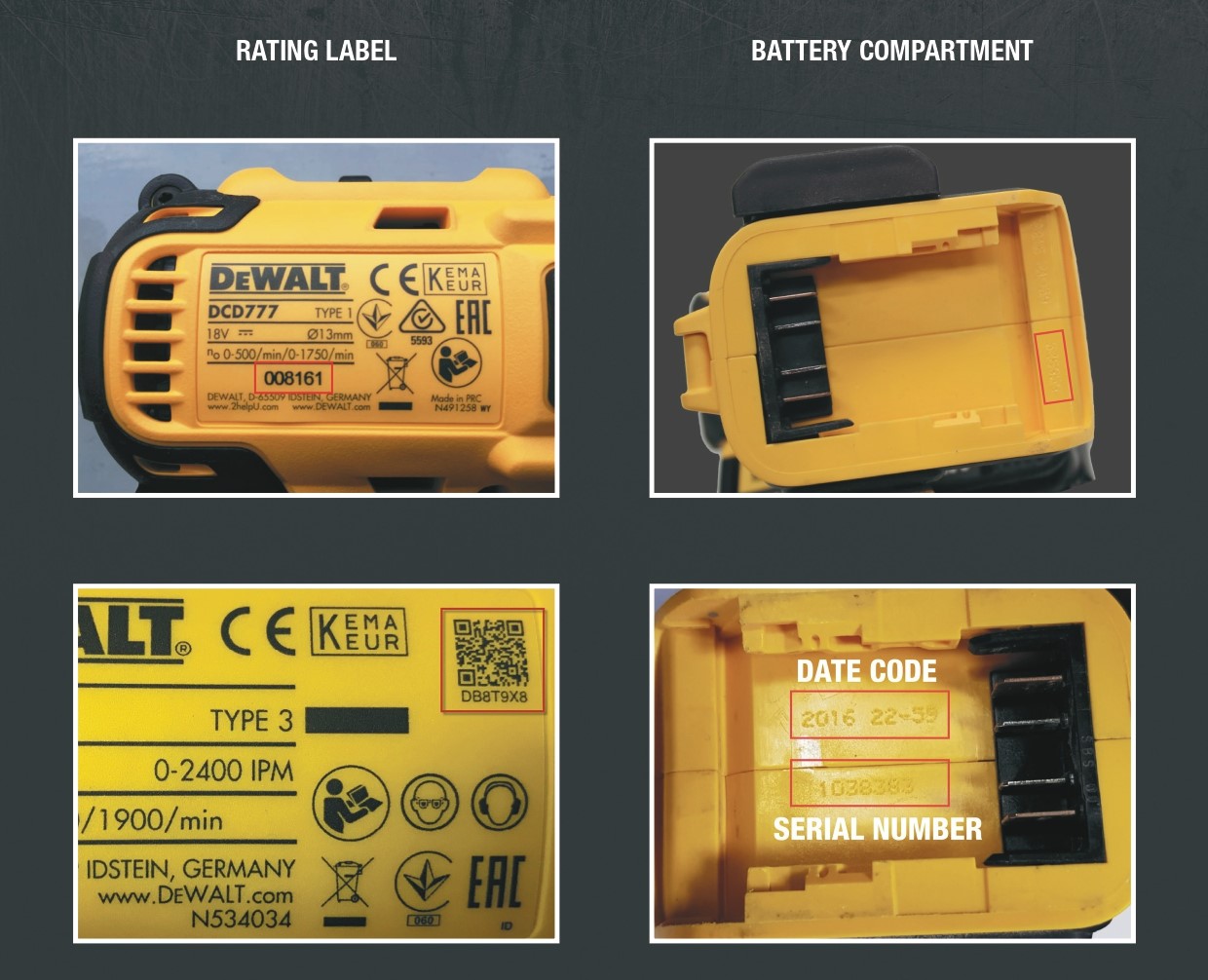
You can usually find a Dewalt tool serial number on its rating label or inside the battery compartment. On many newer cordless tools, the number sits near the battery port, sometimes just below a QR code. Check the tool itself rather than relying on the number printed on its box.
In the United States, a Dewalt tool serial number can help when you register a new drill, request warranty service, arrange a repair, or identify a tool you already own. The number may be easy to spot on a clean tool, but dust, worn labels, and changes in label design can make the search harder. Start with the product label, then check the battery slot if the first search fails.
The serial number is not the same as the model number or date code. Each marking serves a different purpose. The model number identifies a product design, the serial number identifies an individual unit, and the date code can help show when the tool was made. Knowing the difference can save time when filling out a registration or repair form.
The fastest place to look is the tool‘s rating label. This label carries product details and may show the model number, serial number, electrical ratings, safety marks, and other manufacturing information. Its exact position depends on the tool type and model.
Dewalt’s US support guidance explains that traditional cordless tools often have the serial number on a side identification label. Some newer cordless products place it in the area where the battery fits. This change means that a quick look at the outside may not be enough.
Before you begin, switch off the tool and unplug it if it has a cord. For a cordless tool, remove the battery before checking the battery compartment. Keep the battery and contacts free from loose metal items, and do not use sharp objects to scrape a label clean.
Source: slashgear.com
Side label
Look along the side of the motor housing or main body. This is a common location on cordless drills, impact drivers, and other handheld tools.
Battery compartment
Remove the battery and inspect the inner walls and nearby housing. Newer cordless tools may place the serial number near the battery port or QR code.
Rear or underside label
Check the rear of the housing and other visible label areas when the side label does not show the number.
Product documentation
Keep the receipt, packaging, and manual nearby. These may help you identify the model, but the number on a box may differ from the serial number on the actual tool.
Finding the Serial Number on a Dewalt Drill
Start with the side of the drill body. Check the label near the motor housing and handle, then inspect the battery port after removing the battery. On some models, the serial number appears close to a QR code, so look for a separate printed number rather than assuming the QR code itself is the serial.
A drill may have several groups of letters and numbers on one label. Read each marking carefully. The model number, voltage rating, safety information, date code, and serial number can appear close together, but they are not interchangeable.
Step 1
Remove the battery and place the drill on a stable work surface.
Step 2
Inspect the side label under good light.
Step 3
Check the battery port and nearby housing if the serial number is not visible.
Step 4
Take a clear photo of the whole label, then zoom in to read the exact characters.
Finding the Serial Number on Other Dewalt Tools
The location can differ on impact wrenches, circular saws, grinders, sanders, lawn tools, and corded equipment. A marking found on one drill model may not appear in the same place on another tool. Start with the rating label and consult the product manual or Dewalt support if needed.
For larger tools, inspect the main housing and visible rating plate. For outdoor power equipment, check the body and the areas named in the model-specific manual. Do not dismantle the tool to reach a hidden marking unless the manufacturer’s instructions clearly call for it.
Impact wrench
Inspect the housing and any product identification label near the grip or motor body.
Circular saw
Check the motor housing and rating plate, keeping clear of the blade and moving parts.
Corded tool
Look for the rating label on the main body. Unplug the tool before inspection.
Outdoor equipment
Use the model-specific guide because labels may sit on different parts of the housing.
How to Identify the Correct Number on the Label
Read the text beside each marking before you record a number. A Dewalt label may contain several codes, and the longest string is not always the serial number. Look for a label that specifically identifies the serial number, or compare the layout with the official guide for your tool.
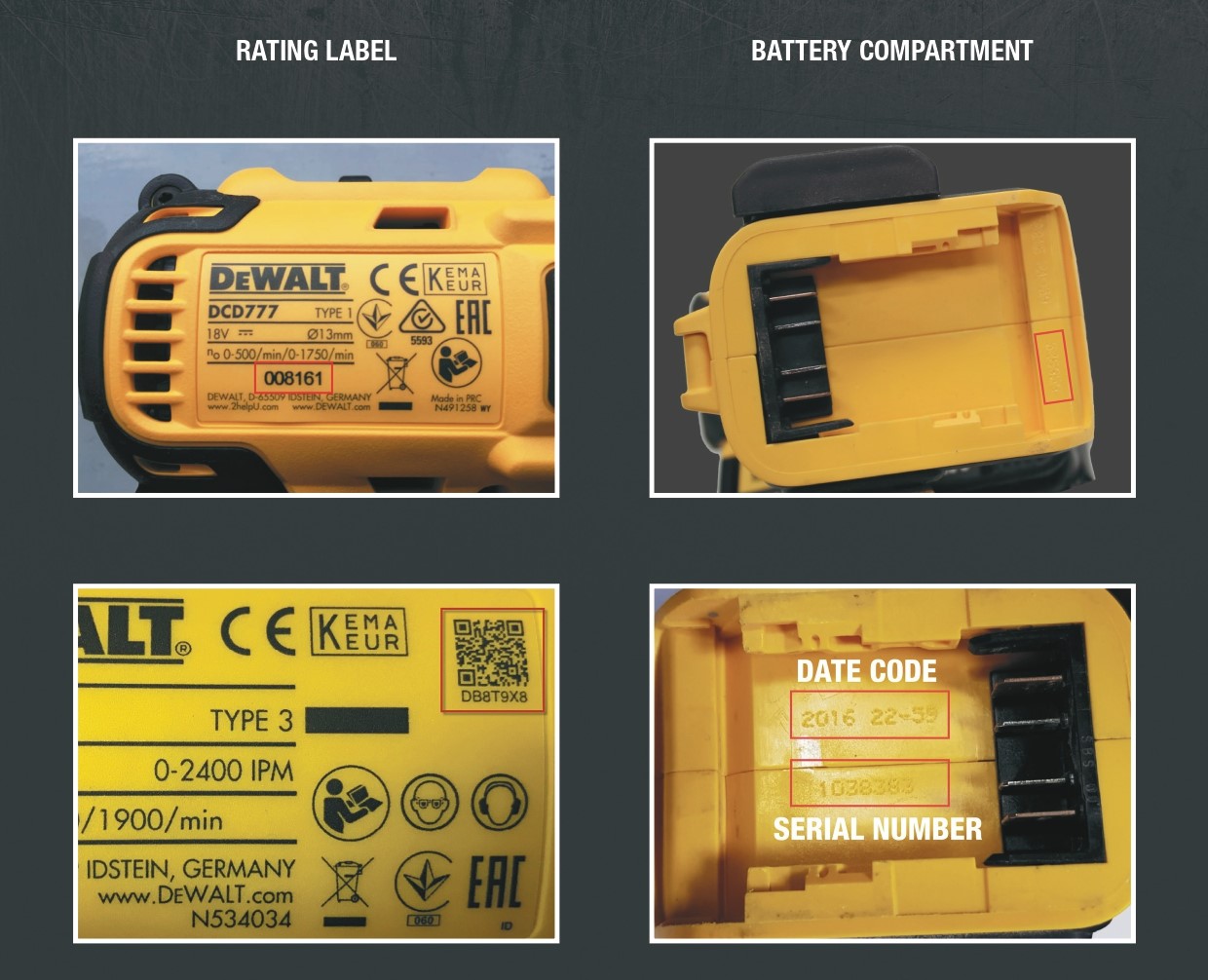
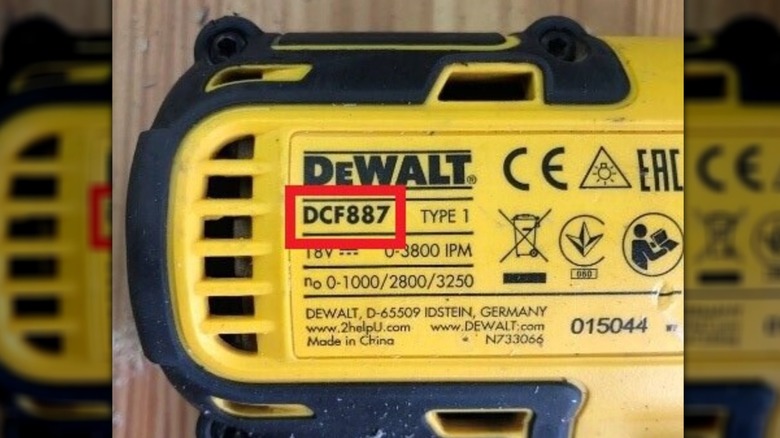
The model number generally starts with the letter D on Dewalt power tools. A model number may also include extra letters or digits that describe a kit or product variant. The serial number can contain digits alone or a mix of letters and digits, so its format is not a reliable way to identify it by itself.
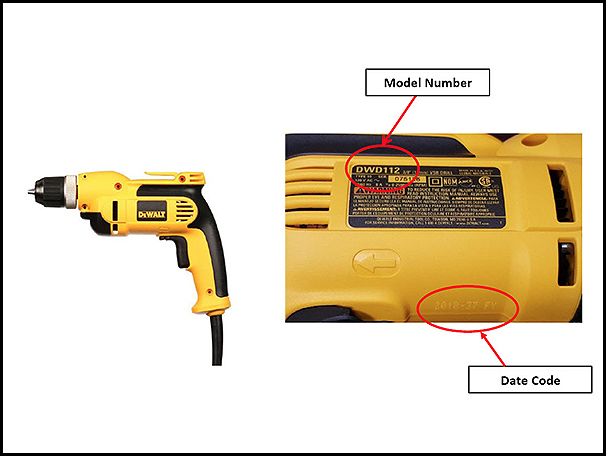
A date code is another separate marking. Dewalt’s support information describes a common tool date-code format as a four-digit year followed by a two-digit week and two further characters. The exact layout can vary by product type, so use the appropriate manufacturer’s instructions instead of guessing from the digits.
Source: woodworkersjournal.com
Model number
Identifies the tool design or product version. Use it to find the right manual, parts diagram, or repair information.
Serial number
Identifies an individual product unit. It may be required when dealing with registration, support, or a repair request.
Date code
Provides manufacturing-date information in a product-specific format. It should not be mistaken for the individual serial number.
QR code
May provide a digital route to product information. Do not assume the QR code and the printed serial number are the same thing.
Example of Three Different Product Markings
Consider a hypothetical tool label with the model DCD777, the serial number 12345678, and the date code 2024-18-AB. These values are examples only, not a verified record for a real Dewalt tool. In this example, DCD777 identifies the model, 12345678 is the individual serial number, and 2024-18-AB is the date code.
Do not use this example to decode an unknown number. First confirm which field the label assigns to each marking. If the serial number is not clearly labeled, send a photo of the label to Dewalt support rather than selecting a number based only on its length.
For product registration
Enter the serial number in the serial-number field and the model in the model-number field.
For a repair request
Record the model and any requested date code separately. Follow the repair form’s instructions for each field.
How to Find a Serial Number When the Label Is Hard to Read
A worn or dirty label does not always mean the serial number is lost. Start with a careful visual check before trying other methods. Fine dust, oil, and workshop grime can hide small text, while glare can make a printed number look blank in a photo.
Use a dry, soft cloth to remove loose dirt from the outside of the housing. If the manufacturer permits it, use a slightly damp cloth for stubborn surface grime, then dry the area. Do not soak the tool, spray cleaner into openings, or use abrasive pads that may remove the printed characters.
Move the tool into bright, even light and take photos from more than one angle. A phone camera can help you enlarge small text, but a sharp photo of the entire label is also useful because it preserves the relationship between each number and its printed heading.
Source: uooz.com
Improve the lighting
Use bright light from the side to reduce glare and reveal faint print.
Try a clear photo
Hold the camera steady and take one photo of the full label plus a close-up.
Check another location
Inspect the battery compartment and other label locations described in the manual.
Avoid scraping
Do not use a blade, wire brush, sandpaper, or strong solvent to uncover the number.
What If the Serial Number Is Missing?
If the label is damaged, faded, or absent, contact Dewalt’s US support team. Share the model number, a clear photo of the tool, photos of any remaining labels, and proof of purchase if available. Explain that the serial number cannot be read so the representative can tell you what information is acceptable for your specific request.
Do not make up a serial number or copy one from another tool. A guessed number can lead to a failed registration or a delay during service. If a form offers an alternative for a missing serial number, follow the current instructions shown by Dewalt rather than entering an unrelated code.
Dewalt’s published support guidance for some registration situations gives an alternative when the serial number cannot be found. The accepted entry depends on the form and region. Confirm the current US instructions before using a purchase date or another substitute.
Keep the purchase record
A receipt or order confirmation may help support staff verify where and when you bought the tool.
Photograph all markings
Include the model number, rating label, and any visible date code.
Ask before submitting
Contact support if the registration or repair form rejects your information.
How to Use Your Dewalt Tool Serial Number for Registration
A serial number can be one part of product registration, but it is not the only information you may need. Dewalt’s US registration process can ask for the model number, serial number, purchase date, place of purchase, and proof of purchase. Have those details ready before you start.
Visit the official Dewalt US website and open its product-registration area. Sign in or create an account if the site asks you to do so. Select the registration option and enter the product information in the matching fields.
Check every character before submitting. The letters O and I can be confused with the digits 0 and 1 on small labels. If the form does not accept the number, compare your entry with the label again and verify that you selected the correct product model.
Source: slashgear.com
Prepare the details
Gather the model number, serial number, purchase date, retailer name, and receipt.
Use the official site
Start at Dewalt’s US support website rather than an unfamiliar third-party registration page.
Enter the label details
Copy the number exactly as printed. Do not add spaces or remove characters unless the form tells you to.
Save the confirmation
Keep the confirmation email or registration record with your receipt.
Do You Need to Register Every Tool in a Kit?
A combo kit may contain several tools, a charger, and one or more batteries. Do not assume that registering the kit automatically creates an individual record for every item. Dewalt’s product guidance says that tools in some combination kits should be registered individually, using the model details on each tool’s rating label.
Warranty terms can differ by product and item type. Batteries, chargers, and the main tool may not share the same coverage period or registration rules. Check the current US warranty terms that apply to the product you bought, and keep the receipt for each purchase.
Check each tool
Record the model and serial number for each power tool in the kit.
Read the warranty terms
Confirm which items need registration and what proof of purchase is required.
Can a Dewalt Serial Number Tell You the Tool’s Age?
Do not assume that a Dewalt serial number reveals the manufacturing date. Dewalt provides separate guidance for date codes, and that is the marking to check when you need manufacturing-date information. The serial number may be numeric or alphanumeric, so its appearance alone does not establish the year the tool was made.
On products that use the documented date-code format, the first four digits can represent the year and the next two can represent the production week. The final characters may carry additional code information. Confirm the format for the exact product before using it to estimate age.
A manufacturing date and a purchase date are different. A tool may sit in a warehouse or on a retailer’s shelf before someone buys it. The date code therefore should not be treated as proof of the purchase date or as a guarantee of remaining warranty coverage.
Source: toolboxtours.com
For the manufacturing date
Find the date code and check the relevant Dewalt guidance for the product type.
For the purchase date
Use the receipt, invoice, or retailer order history.
For warranty coverage
Check the warranty terms and ask Dewalt to confirm coverage for the specific product.
How to Read a Common Dewalt Date Code
Dewalt’s support guidance gives 2017-22-59 as an example of a date code format. In that example, 2017 represents the year and 22 represents the production week. The remaining characters are part of the code, so they should not be treated as a second serial number.
This example explains the pattern documented for the relevant tool guidance. It is not a universal decoding rule for every Dewalt battery, charger, accessory, or power tool. When the label format differs, use the product-specific instructions or contact support.
Find the date field
Look for a printed or stamped date code on the rating label or another location named in the manual.
Confirm the format
Use the official guide for the tool family rather than guessing from a string of digits.
Record the full code
Keep all letters, digits, and leading zeros when sending the code to support.
Does a Dewalt Serial Number Prove a Tool Is Genuine?
No. A serial number by itself does not prove that a Dewalt tool is genuine. A printed number can be copied, and a label may be damaged or replaced. Treat the serial number as one piece of product information, not as a stand-alone authenticity test.
If you are buying a used tool in the United States, inspect the tool in person when possible. Compare the model and markings with official product information, ask for a receipt or other purchase record, and check whether the seller can explain the tool’s history. Be cautious if the label has been removed or altered or the seller refuses to provide basic product details.
When something looks wrong, contact Dewalt through its official US support channel. Send clear photos of the tool and labels and describe where you obtained it. The manufacturer can advise on the next steps, though you should not assume that a serial-number check alone will settle every authenticity question.
Source: woodworkersjournal.com
Check the model
Compare the model marking with the official product page or manual.
Review the purchase record
Ask for a receipt or order confirmation when the seller has one.
Inspect the label
Look for signs of damage, missing text, or labels that appear to have been changed.
Ask official support
Use Dewalt’s support service if the product markings raise questions.
What If the Serial Number Is on the Box but Not the Tool?
Do not copy the box number into the tool’s serial-number field without checking. Dewalt’s support guidance warns that a serial number on the box can differ from the number on the product itself. Look for the number on the tool first.
If the tool has no readable number, keep the packaging and receipt and contact support. Explain that the tool marking is missing or unclear. The box can still help identify the product, but it should not be treated as a substitute for the tool’s own marking unless Dewalt instructs you to use it.
Keep both records
Photograph the box label and the tool label so the difference is clear.
Do not guess
Wait for guidance if the correct number cannot be identified.
Troubleshooting Common Dewalt Serial Number Problems
Most serial-number problems come down to a hard-to-read label, confusion between different codes, or a form that does not accept the entry. Work through the simple checks first. You usually do not need to open the tool or remove any internal parts to find its identification details.
If the number appears correct but the registration system rejects it, verify the model and region. A product may have a model variant that is not listed exactly as printed, or you may be using a form that expects a different field. Contact Dewalt support if the official site still will not accept the information.
Source: support.dewalt.com
The number is too small
Use brighter light and take a close-up photo. Check the whole label before choosing the serial-number field.
The label is missing
Check the battery compartment and other documented locations. Contact support if the number remains unavailable.
The registration form rejects it
Check similar-looking characters and make sure the model and serial number have not been switched.
The box and tool numbers differ
Use the number printed on the tool and ask support if the correct entry is unclear.
The date code looks unusual
Consult the guide for the specific tool family. Do not try to decode every code with one universal pattern.
When to Contact Dewalt Support
Contact Dewalt if the serial number cannot be found, the label is damaged, the product details conflict, or a registration or repair form rejects a number you have checked. The official US support page offers product help, warranty information, registration guidance, and service options.
Prepare the model number, all visible codes, purchase date, retailer, and receipt if available. Include photos of the whole tool and close-ups of each label. State the exact problem, such as a missing serial number or a date code that does not match the expected format.
Use the contact details listed on Dewalt’s official US website because support options and service procedures can change. Avoid sharing unnecessary personal details or posting a full serial number publicly when a private support channel will do.
Where is the serial number on a Dewalt cordless drill?
Check the side identification label first. If you cannot find the number there, remove the battery and inspect the battery compartment. Some newer Dewalt cordless tools place the serial number near the battery port, sometimes below a QR code.
Q
Is the Dewalt model number the same as the serial number?
No. The model number identifies the tool design or version, while the serial number identifies an individual unit. A date code is a separate marking that may help identify when the product was made.
Q
Can I look up a Dewalt tool by its serial number?
Start with Dewalt’s official US support and product-registration pages. The serial number may be needed for a support or repair request, but it is not a guarantee that a public lookup will show the tool’s full history. Use the model number to find the manual and product information.
Q
Can I register my Dewalt tool without a serial number?
The answer depends on the registration form and the product. Check the current instructions on Dewalt’s official US site. If the serial number is missing or unreadable, contact support and ask what alternative details they will accept. Do not invent a number or use one from another tool.
Q
Does a Dewalt serial number show the year it was made?
Do not rely on the serial number alone to establish the manufacturing year. Look for the separate date code and confirm its format using Dewalt’s guidance for your model. A manufacturing date also does not prove when the tool was purchased.
Q
Why is the serial number on my Dewalt tool different from the box?
The number printed on the box may differ from the serial number on the tool itself. Dewalt advises users to check the product’s own marking. If the tool’s number is missing or the records do not match, keep the packaging and receipt and ask official support for guidance.
Q
Can a Dewalt serial number prove a used tool is genuine?
No. A serial number is not conclusive proof of authenticity because markings can be copied or altered. Check the model, product label, purchase record, and seller information. Contact Dewalt if the markings look suspicious or the product details do not match.
✦ Wrapping Up
Conclusion
Finding a Dewalt tool serial number is usually simple once you know where to look. Start with the rating label on the side of the tool, then check the battery compartment if the number is not visible. Use good light, take clear photos, and avoid scraping or damaging the label.
Keep the serial number separate from the model number and date code. That small step can prevent mistakes during registration, warranty questions, and repair requests. If the number is missing or unreadable, use Dewalt’s official US support service rather than guessing.
💡 Key Takeaway
Switch off or unplug the tool, remove its battery if applicable, and photograph the rating label. Record the model number, serial number, and date code as separate entries. If the serial number is missing, keep your receipt and contact https://www.dewalt.com/en-us/support for product-specific guidance.