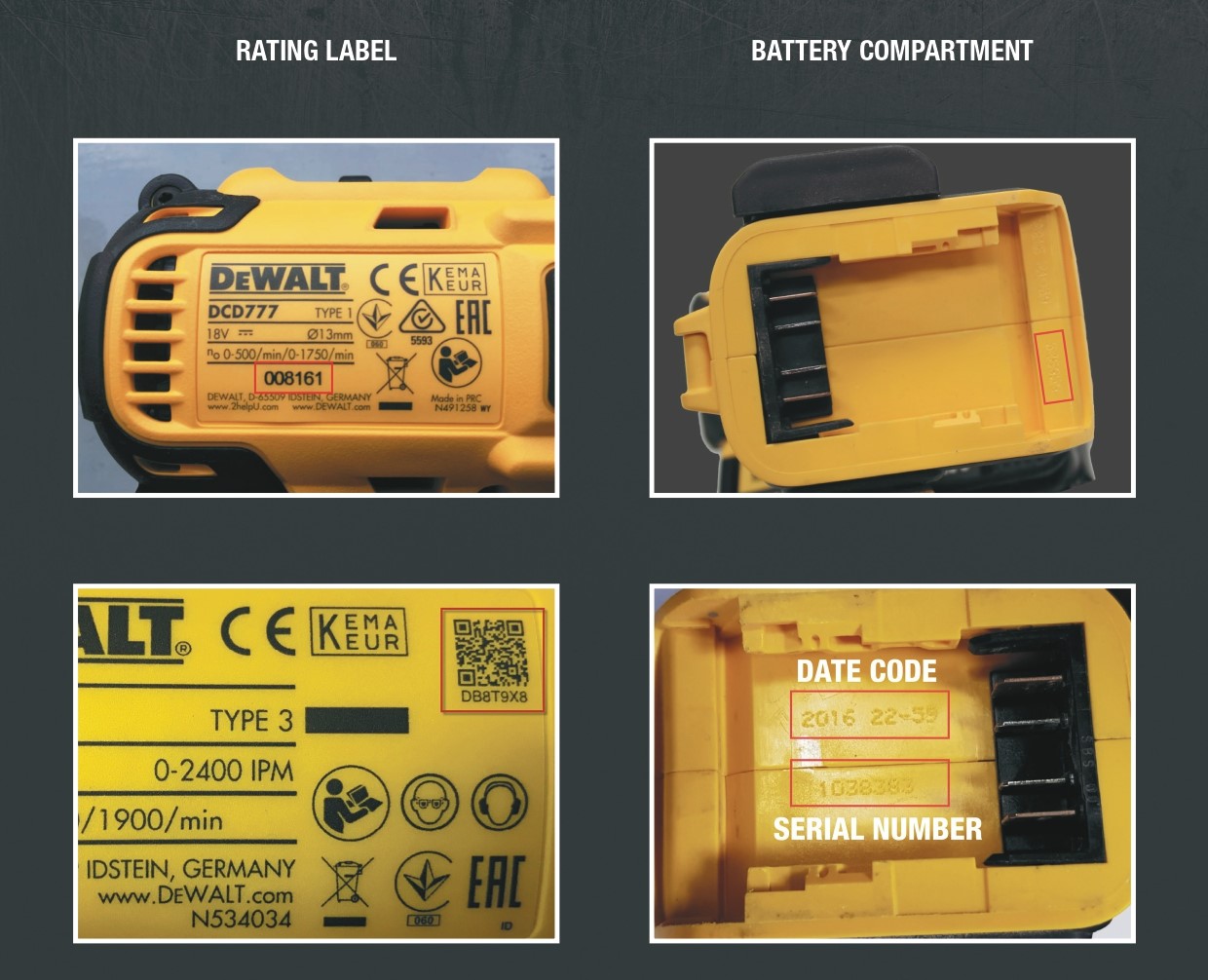
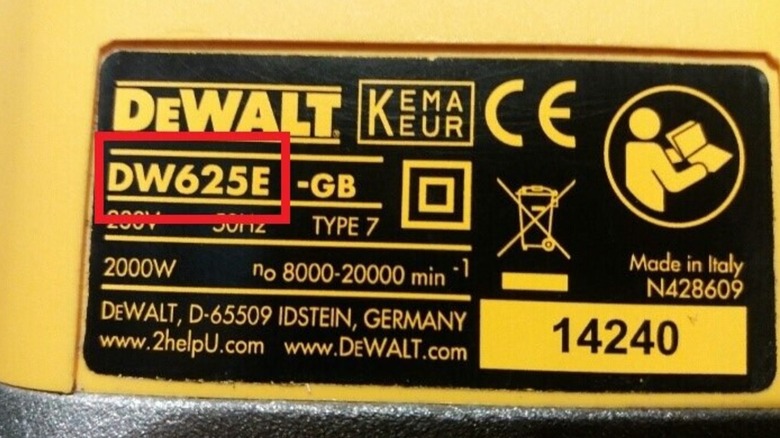
The serial number on DEWALT tools is usually on the rating label or inside the battery compartment. On some newer cordless tools, you may need to remove the battery to see it. The number can contain digits, letters, or both.
In the United States, you may need a DEWALT tool serial number to register a new drill, request warranty service, order a repair, or keep track of tools on a job site. The first step is to check the tool itself. Do not rely only on the box, since its number may not match the one on the tool.
DEWALT uses several codes on its tools. The serial number, model number, and date code serve different purposes. Once you know which code you need, you can find it faster and avoid entering the wrong details on a support form.
This guide follows DEWALT’s published product identification guidance. It covers common cordless drills, impact drivers, grinders, and other power tools, along with batteries, chargers, and older tools. Exact locations can vary by model, so the product label and official support guidance remain the best references.
The serial number on most DEWALT tools is found on a rating label or inside the battery compartment. A rating label is the printed or marked panel that lists product details and safety information. Its position depends on the tool design.
Start with the outside of the tool. Look for a label with the DEWALT name, model number, electrical details, and other product codes. If you cannot find a serial number there, check the battery slot on a cordless tool.
DEWALT states that some newer cordless products place the serial number in the more protected area where the battery fits. This change can make the number less likely to wear off during normal use. It also means that a quick look at the outer case may not be enough.
Source: support.dewalt.com
Side or rear label
Check the main body, handle area, rear housing, or side panel. Look closely at the printed text and nearby QR code.
Battery compartment
Remove the battery from a cordless tool and inspect the inside of the battery slot for a label, engraving, or printed code.
Underside or base
Check the base or underside when the outer side label does not show the serial number. Some tool designs use less visible areas.
Tool-specific location
If none of these spots works, use the official instructions for your exact model. A single location does not apply to every DEWALT product.
Finding the Number on a DEWALT Drill
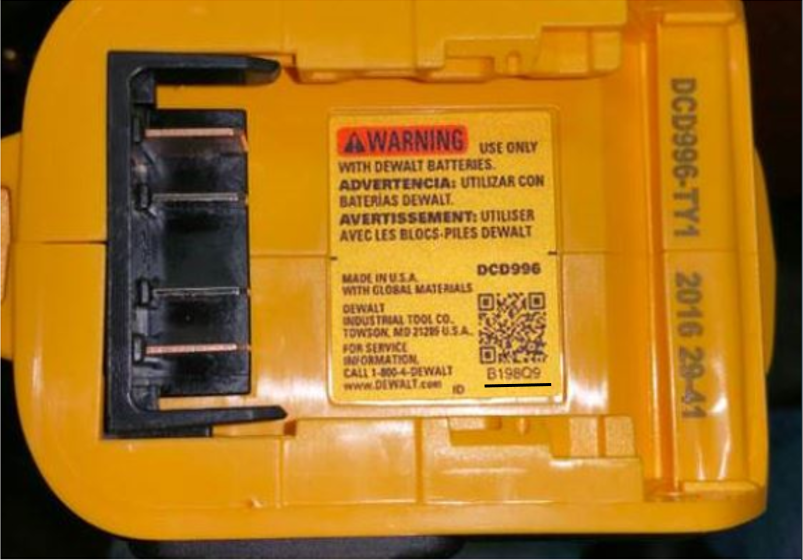
For a cordless drill, first inspect the side of the housing near the model and rating details. Then remove the battery and check the battery slot. DEWALT’s published example for the DCD996 shows the serial number inside the battery port, just below the QR code.
Keep the drill switched off while you inspect it. Remove the battery before handling the battery compartment, and do not touch or bridge the electrical contacts with metal tools. A flashlight can help you read small print without taking the drill apart.
Read the whole label
Look for a field marked serial number or a distinct code near the QR code. Do not assume that the longest number is always the serial number.
Use a clear photo
Take a close-up photo in good light. Zoom in on the photo to read small characters without scraping or marking the label.
Finding the Number on a DEWALT Impact Driver or Grinder
Impact drivers often use a layout similar to cordless drills, but the label may sit in a different place on the housing. Check the outer rating label first, then inspect the battery compartment if the tool is cordless.
Grinders can differ more. DEWALT support describes changes to the location of identification markings on certain grinder designs. Some corded grinder models have markings on the gear housing under the guard, while cordless models may place the date code in the battery compartment. Do not treat a location for one grinder as proof that every grinder uses the same layout.
Never remove a guard or open a housing just to search for a serial number. If the number is hidden behind a part that requires disassembly, check the product manual or ask an authorized service center for help.
Cordless tools
Check both the rating label and the battery slot, with the battery removed.
Corded tools
Inspect the rating label and follow model-specific support instructions for any extra markings.
How to Find the Serial Number Step by Step
The easiest way to find the serial number is to inspect the tool in a set order. Start with the visible label, check the battery compartment if needed, and then use the exact model’s support page. This method helps you avoid confusing a model number or date code with the serial number.
You do not need to open the tool or remove its fixed parts. A phone camera and a flashlight are often enough to read a faded or small label. Keep the tool off while you work.
Source: woodworkersjournal.com
Step 1: Switch off the tool
Unplug a corded tool before inspection. For a cordless tool, switch it off and remove the battery.
Step 2: Find the rating label
Look on the side, rear, underside, and handle area. Search for the DEWALT logo and product information.
Step 3: Read the identification fields
Look for the serial number field or a separate alphanumeric code. Record the model number and date code too, but keep them in separate fields.
Step 4: Check the battery slot
If the serial number is not on the visible label, inspect the battery compartment for a code or QR label.
Step 5: Record the number
Copy the full code exactly as printed. Check letters and digits that look alike, such as O and 0 or I and 1.
Step 6: Verify the result
Compare your notes with DEWALT’s official identification guide for the model. Contact support if you cannot tell which code is the serial number.
What to Do If the Label Is Hard to Read
Dust, paint, wear, and poor lighting can make small codes hard to read. Wipe the outside with a soft, dry cloth and use a flashlight at an angle. Avoid harsh cleaners, sharp blades, sanding, or scraping, since these can damage the label or hide the text further.
Take a few photos from different angles. A close-up can help, but also keep one wider photo that shows where the label sits on the tool. This gives DEWALT support useful context if you need help identifying the code.
If the label has faded away, do not make up a number or use a random number from a similar tool. Gather the model number, purchase receipt, date code, and clear photos. DEWALT support may be able to explain what options are available for that model.
Use good light
A flashlight or daylight can make shallow engraving and low-contrast print easier to see.
Save the proof of purchase
A receipt can help support staff identify the product and review a warranty or service request.
Serial Number vs. Model Number vs. Date Code
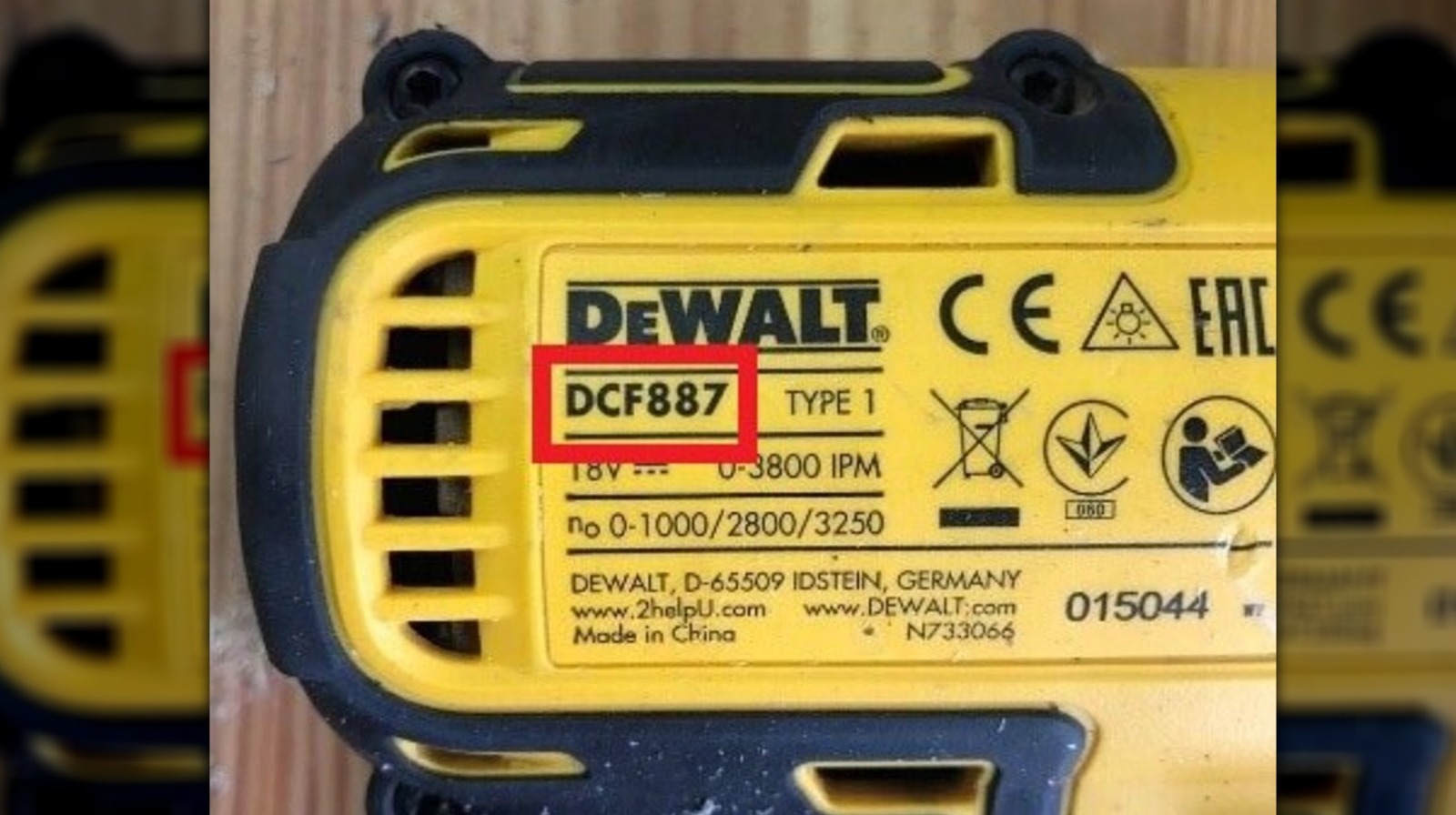
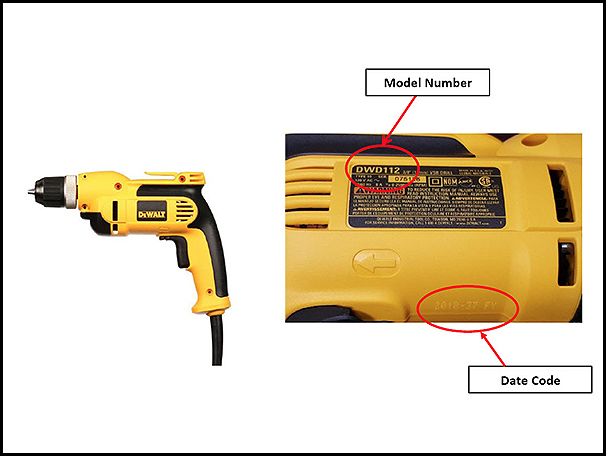
DEWALT tools can have several numbers on one label, and each has a different job. The serial number identifies a particular product unit in the manufacturer’s records. The model number identifies the tool design or product model. The date code gives manufacturing-date information when interpreted under the correct code format.
These codes are not interchangeable. A repair site may ask for the model and type number to match parts, while a registration form may ask for the serial number and purchase details. Read the field name before entering a code.
Source: uploads.tapatalk-cdn.com
Serial number
A product identification code that may contain digits only or a mix of letters and digits. Use the serial number shown on the tool when a form requests it.
Model number
Identifies the product model. DEWALT model numbers generally begin with D, but the full code can include suffixes that identify a kit or product variant.
Date code
Provides manufacturing-date information. Its exact format and location can vary by product and market.
Type number
On some products, identifies a version of a model. It can matter when choosing the right service parts or diagrams.
How to Tell Which Number You Need
Start with the form or task in front of you. If you are registering a tool, enter the serial number in the serial-number field and the model in the model-number field. If you are looking for a parts diagram, the model and type number may be more useful than the serial number.
For example, a tool marked DCD996 may have that model code printed near other details on its label. A different code elsewhere on the tool may be its serial number. The model identifies the type of tool, while the serial number distinguishes the individual unit.
Do not use a date code as a substitute for a serial number unless DEWALT’s own instructions for that exact process tell you to do so. Some registration workflows may offer a way to proceed when a serial number cannot be found, but that does not make the date code and serial number the same thing.
For product registration
Have the model number, serial number, purchase date, retailer details, and receipt ready when the form requests them.
For parts and diagrams
Check the model and type number on the rating label and compare them with the official parts listing.
For manufacturing-date questions
Use the date code and the manufacturer’s instructions for reading it. Do not guess a date from an unfamiliar string of numbers.
Can You Decode a DEWALT Serial Number?
A serial number is mainly an identification code. Its characters should not be treated as a universal date formula. DEWALT publishes separate guidance for finding date codes, and that code is the better starting point when you need manufacturing-date information.
Some date-code formats include a year and a week, but formats can vary by product and code version. Do not apply one example to every drill, grinder, battery, or charger. If the code is unclear, ask DEWALT to interpret it using the model and product details.
A serial number alone also does not prove that a tool is genuine, unused, or still covered by a warranty. Those questions may require purchase records, product inspection, or confirmation from the manufacturer.
Avoid online guessing tools
Do not trust a third-party decoder unless its method is supported for the exact model and code format.
Check the official guide
Use DEWALT’s product identification and date-code guidance before drawing conclusions about a tool’s age.
Where to Find Numbers on DEWALT Batteries and Chargers
Batteries and chargers have their own identification labels, and their codes may not follow the same layout as the tool itself. Check the product body rather than assuming the number on the drill also identifies its battery or charger.
DEWALT’s support guidance says that battery model numbers are commonly printed or engraved on the bottom of the battery housing. Charger model numbers may be on the top or bottom, often near the label or the area where the battery slides in.
A model number and a serial number still mean different things. If you need information about a battery or charger, state which item you have and read the requested field carefully. A code printed on the tool may not answer a question about the battery.
Source: lasopapussy202.weebly.com
Battery model
Look at the bottom of the battery housing for a model code. DEWALT battery models commonly begin with DCB.
Charger model
Check the top and bottom of the charger, including the area near its warning label.
Battery serial or date information
Look for clearly marked fields and follow the guidance for that exact battery. Do not assume every battery uses the same serial-number layout.
Do Not Mix Up a Battery Code and a Tool Code
A drill, battery, and charger can all carry different identification details. If you are registering a tool or requesting service, make sure the code belongs to the item named on the form.
For a kit with more than one tool, record the details for each tool separately. Keep the battery and charger information in their own fields if you maintain an inventory. This small step can save time when you need a replacement or repair.
Label each item in your records
Write down the item type, model number, serial number when present, purchase date, and receipt location.
Keep photos with the records
Save a clear photo of each item’s identification label so you can check it later.
Why the DEWALT Serial Number Matters
The serial number can help identify a tool when you contact the manufacturer or keep records for a business. It is useful for product registration, service questions, and inventory tracking, but it is not the only information you may need.
For a warranty or repair request in the United States, you may also need the model number, purchase date, proof of purchase, and a description of the problem. The exact details depend on the service process and the product. Check the current terms for your tool rather than assuming every DEWALT product has the same coverage.
A serial number is also useful when several tools look alike. Two drills of the same model can be tracked as separate units in a shop, work van, or home workshop. This can help you match each tool to its own receipt, service history, or assigned worker.
Source: uooz.com
Registration
Use the tool’s identification details when completing the manufacturer’s product registration process.
Warranty or repair support
Keep the serial number and proof of purchase ready. The manufacturer can explain what else is needed for the claim.
Parts lookup
Use the model and type number when looking for compatible parts, manuals, or diagrams.
Tool inventory
Record each serial number beside the item’s model, purchase details, location, and assigned user.
Using the Serial Number for Warranty Service
If a tool stops working, first find its model number and serial number, then gather the purchase receipt. Write down the fault and when it began. Clear details help you explain the problem without guessing about the cause.
Use DEWALT’s official United States support site to review the current repair or warranty process. Some requests may ask for the purchase date, date code, or other details in addition to the serial number. Follow the form’s exact instructions.
Do not assume that having a serial number guarantees free repair. Coverage depends on the applicable warranty terms, product, purchase details, and the nature of the fault. Damage from misuse or normal wear may be treated differently from a covered defect.
Before you submit
Check the model, serial number, purchase date, retailer, and receipt for errors.
If a form rejects the number
Confirm each character and verify that you entered the code in the correct field. Contact support if the issue remains.
What to Do If You Cannot Find the Serial Number
If you cannot find the serial number, do not assume that the tool has none. The number may be inside the battery compartment, hidden by dirt, worn off, or placed in a less obvious spot for that model. Work through the safe checks before contacting support.
Start with the exact model number and DEWALT’s official product guidance. If the label is damaged, collect photos of the tool, remaining label text, date code, and proof of purchase. These details may help support staff identify the product even when one field is unreadable.
Avoid copying a serial number from a similar tool or using a number from a product box as if it were confirmed. A guessed number can cause problems during registration, repair, or inventory checks. Let the manufacturer explain how to proceed when the original marking cannot be read.
Source: slashgear.com
Check the less visible areas
Inspect the rating label, rear housing, underside, and battery compartment as appropriate for the tool.
Use the exact model
Search official DEWALT support for the model-specific location guide rather than relying on a different tool’s layout.
Gather supporting records
Keep the receipt, purchase date, retailer, model number, date code, and photos ready.
Ask the manufacturer
If the code is missing or damaged, contact DEWALT support or an authorized service center for guidance.
Can You Use the Number on the Box?
Use the number printed on the tool whenever the process asks for the tool’s serial number. DEWALT’s serial-number guidance warns that the number on the box can differ from the number on the product itself.
A box can still help you identify the model or product kit, especially when the tool label is hard to read. However, do not treat a box code as a confirmed serial number unless DEWALT verifies that it is the correct field for your request.
If the box and tool details differ, take photos of both and ask support which information applies. Keep the original receipt, since the product packaging alone may not prove when or where you bought the tool.
Use the tool label first
Record the code directly from the product when it is visible and legible.
Treat the box as supporting evidence
Use the packaging to help identify the product, not as a replacement for a confirmed serial number.
Is a Missing Serial Number Proof That a Tool Is Fake?
No. A missing, damaged, or hard-to-read serial number does not by itself prove that a DEWALT tool is counterfeit. Labels can wear, markings can be difficult to see, and product designs can differ.
At the same time, a visible serial number does not prove that a tool is genuine. If you have concerns about a secondhand purchase, compare the product details with official documentation and ask DEWALT support to review the available information.
Be careful with unusually low prices, unclear seller records, altered labels, or details that do not match the model. These signs may justify further checks, but a final conclusion should not rest on one number alone.
Compare the product details
Check the model, label, product design, and included parts against official information for that exact model.
Keep purchase records
Save the seller details, receipt, and listing information if you need to ask for help with a secondhand tool.
Common Mistakes to Avoid
Most serial-number problems come from mixing up codes, missing the battery compartment, or copying characters incorrectly. A careful check can prevent a failed form or a delay in service.
Take your time when reading a small label. The letter O can look like zero, and the letter I can look like one. Use the label’s field names and official model-specific guidance to confirm the code before sending it.
Source: woodworkersjournal.com
Using the model number as the serial number
The model identifies the product design. Enter it only in the model field unless the form gives different instructions.
Ignoring the battery compartment
Some newer cordless tools place the serial number inside this area rather than on the outer side label.
Assuming every tool has the same layout
Different models and tool types can place their markings in different spots.
Guessing the manufacturing date
Use the date code and the correct manufacturer’s guidance. Do not decode an unfamiliar serial number by guesswork.
Using a number from another tool
Record each tool’s own number. Similar-looking tools can be separate units with different identification details.
Opening the tool to search
Do not dismantle the housing or remove guards for a serial-number search. Use official guidance or an authorized service center.
A Simple Record-Keeping Method
Once you find the number, save it in a place you can access later. A digital note or spreadsheet can hold the model, serial number, date code, purchase date, retailer, and receipt file name.
For a workshop or job site, give each tool its own record. If several tools share the same model, this helps you tell them apart when a repair, return, or inventory check comes up. Keep a clear photo of the label with each record.
Store purchase records and serial numbers securely. Share them with DEWALT, an authorized service provider, or another trusted party when needed, rather than posting full identifying details in public listings without a good reason.
Record the basics
Save the product type, model, serial number, date code, purchase date, and retailer.
Save a label photo
Keep a clear image of the label and a wider photo showing the tool it belongs to.
Update after service
Add repair dates and service records so you can track the tool over time.
Frequently Asked Questions
Q
Where is the serial number on a DEWALT cordless drill?
Check the rating label on the drill first. If the serial number is not visible, remove the battery and inspect the battery compartment. Some cordless models place the number near a QR code inside the battery slot. The exact location depends on the model.
Q
Does every DEWALT tool have a serial number?
Many DEWALT tools have a serial number on the rating label or in another marked area. The format and location can vary. If you cannot find one, check the official guide for your model and contact DEWALT support rather than assuming the tool has no serial number.
Q
Is the DEWALT model number the same as the serial number?
No. The model number identifies the tool model, while the serial number identifies an individual unit. The date code provides manufacturing-date information. Keep the codes separate and enter each one in the field that requests it.
Q
Can I find the serial number from the DEWALT tool box?
The box may help you identify the model or kit, but its serial number can differ from the number on the tool. Use the code printed on the product itself when possible. If the tool label is unreadable, ask DEWALT support how to proceed with the information you have.
Q
Can I use the serial number to find the year my DEWALT tool was made?
Do not assume that the serial number contains a date you can decode. DEWALT provides separate date-code guidance for manufacturing-date information. Check the date code on your exact tool and follow the applicable instructions, or ask support to help interpret it.
Q
What should I do if my DEWALT serial number has worn off?
Record the model number, date code if visible, purchase date, retailer, and any readable label details. Take clear photos and keep your receipt. Contact DEWALT support or an authorized service center to ask whether the product can be identified using those details.
Q
Do I need a serial number to register a DEWALT tool?
The registration process may ask for the serial number, model number, purchase date, and place of purchase. Follow the current instructions on the official DEWALT website. If the serial number is missing or unreadable, use the support guidance for that registration process instead of entering a guessed code.
Q
Does a valid-looking serial number prove that a DEWALT tool is genuine?
No. A serial number alone cannot confirm that a tool is genuine or unused. Check the model and product details against official information, review the seller and purchase records, and contact DEWALT if you have concerns about a tool’s origin.
✦ Wrapping Up
Conclusion
The serial number on DEWALT tools is usually found on the rating label or inside the battery compartment. Start with the visible label, remove the battery from a cordless tool before checking the slot, and use the official guide for your exact model if the number remains hard to find.
Keep the serial number separate from the model number and date code. Each serves a different purpose, and the right code can help with registration, repair, product identification, or inventory records. If the label is worn or the number is missing, gather the details you can read and ask DEWALT support for help.
A few minutes spent recording the correct code can save time later. Store a clear label photo and your purchase receipt with the tool’s records, especially if you own several DEWALT products.
💡 Key Takeaway
Switch off the tool, inspect its rating label, and check the battery compartment if it is cordless. Record the full serial number exactly as printed, then verify it with DEWALT’s official support guide before using it for registration or service.